Monday, July 27, 2015

Producing Community User Spotlight Videos with Minimum Equipment

Video production technologies have have improved drastically since I produced my first community vlog 6 years ago. Armed with a DSLR and a laptop, young YouTubers are now creating amazing content rivaling large studios. With this low barrier to entry, there’s never been a better time for community managers to utilize online video as a way to increase engagement.

Recently, one of our Hong Kong based community super-users came to the Bay Area for our company’s sales kickoff. This was a great opportunity for me to get him on camera for a user spotlight video. Brian has been a cornerstone of our community for many years, and I knew all of the community members he has helped would love to meet him “virtually” via a personable video interview. There are, however, a number of challenges I had to work with:
  1. Outside of the sales kick off sessions and business meetings, Brian’s free time was severely limited. I was only able to book an one hour slot on his calendar.
  2. Although we’ve exchange a few emails on interview questions, I did not have a chance to rehearse the interview with Brian. This was going to be a live discussion captured on camera. Once my hour is up, that’s it. Whatever I am able to capture on camera will be what I have to work with.
  3. I do not have the budget to hire a video producer for this type project. I had to handle the entire production process myself: from pre-production all the way to post.
  4. I can not dedicate a lot of post production time to this project. On top of my community management responsibilities, I am managing several large web project as well. I need to be very efficient with this project, and it can not turn into a time sink.
After all’s said and done, the final video was posted 3 hours after I’ve setup the camera. Although it is definitely not the most professional video work I’ve done, I feel that it is something that’s “good enough” for its intended purpose.


Here's how I did it.

Equipment List:

Olympus OM-D EM-5 Body
Olympus M. Zuiko Digital ED 12-40mm f/2.8 PRO Lens
Oben AC-1321 Aluminum Tripod with BA-106A Ball Head
Olympus EMA-1 External Mic Adapter
Realistic Condenser Lavalier Microphone
Tascam DR-05 Audio Recorder
Mini Tabletop tripod
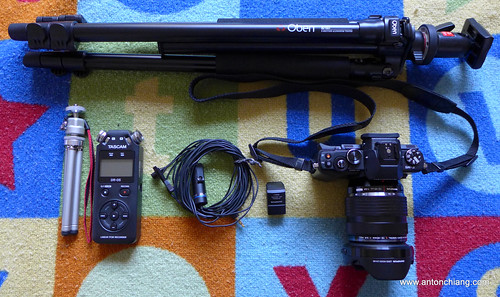

Video Production Kit 1

I’ve recently bought the EM-5 in order to have a lighter interchangeable lens camera. Although I still love my Canon 7D (and its many lenses), it’s not the easiest camera to travel with. The EM-5’s 5-axis image stabilization system makes it easy to shoot handheld, and its small size makes this one-camera interview kit extremely portable.
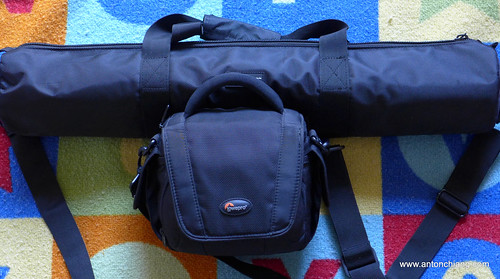
Video Production Kit 2

The 12-40mm f/2.8 lens is the “L” lens of the Micro Four Thirds world. It’s an extremely high quality lens for both video and still photography. The large f/2.8 aperture is a must to get that shallow depth of field film look. It is weather sealed just like the EM-5, and it makes for an excellent walk-around lens when traveling.

Nothing makes a video feel “amateurish” more so than terrible audio captured with the on-camera microphone. For interviews, my 10 year old Realistic condenser lavalier mic still provides better audio quality than any on-camera microphones ever could. I consider audio for video a critical part of any videos worth capturing, and the Tascam DR-05 was set up on the desk in front of Brian as a backup (just in case something goes wrong with in-camera audio capture).

Lighting:

Most offices have fluorescent lamps that look horrible on camera, and this office was no exception. With limited choices in locations, I was lucky enough to find a large office with a glass wall that allowed diffused natural sunlight to come in. This was not the best lighting solution, but with my limited time and resources, it was simply not feasible to bring in and set up a three point lighting kit. Having said this, lighting is the first area I would seriously consider improving in future shoots.

A photo posted by Anton Chiang (@antonchiang) on


Production Process:

To make Brian feel more at ease, I simply rolled the camera and started talking to him. I had to pay very close attention to what Brian was saying, and repeat the question if his response was unusable even with editing. This was a delicate process since 1. my time was limited and 2. the more you make your subject repeat, the more nervous they tend to get. For folks who do not have formal media training, talking into a camera can be a nerve wrecking experience. Filler words such as “ehs” and “ems” begin to increase in frequency when one’s self conscious in front of the camera. It can help to ask the subject to be conscious of not using filler words. In addition, developing a good rapport with the subject can also make the entire process less difficult. 

Post Production:

Brian did fairly well for a completely unrehearsed and rushed interview. However, this still meant that the raw footage I got required some serious editing. I wanted to get the video posted as soon as possible, and I had to show Brian the rough cut before he left town. To expedite the process, I simply used the company PowerPoint template to create all titles and graphics. The entire raw footage file was dumped into the Final Cut Pro X timeline, and I simply cut the clip as I watched it for usable sentences and sound bites. I tried to keep the edits at a slightly fast pace (similar to the quick jump-cut style edit made popular by YouTube vloggers). At the end of the day, I think I was able to introduce Brian to our community in a way that’s infinitely more personable than a text interview.

Obviously, this is a fast paced “good enough” type of production process. If budget allows, community managers should always utilize video professionals to deliver the best results possible. Having said this, I highly encourage you to give the DIY method a try. It can be a rewarding experience for both you and your community. And with success, it may lead to something much bigger than a one-man show.

Tuesday, June 2, 2015

Confession of a Procrastinating Blogger and a Busy Dad / Husband

With additional responsibilities at home and at work, unfortunately this blog has gone attended for a while now. I hope to eventually write more about community building, social media, photography or other topics that interest me. Until then, please look for my updates via these photography communities and social media channels:

500px: 
http://500px.com/alc8

Flickr: 
http://www.flickr.com/photos/alc8/

Facebook Page: 
http://www.facebook.com/AntonChiangPhoto

Instagram:
https://instagram.com/antonchiang/

Picasa Web: 
http://picasaweb.google.com/chiang.anton

Tumblr: 
http://anton365.tumblr.com

Twitter:
http://www.twitter.com/alc8

Linkedin:
http://www.linkedin.com/in/antonchiang


A photo posted by Anton Chiang (@antonchiang) on

Tuesday, October 25, 2011

Photoblog Update

My project 365 photoblog turned out to be an overwhelming challenge after a couple of months. What started out as an exciting idea quickly turned into a serious burden. With a full time job, a family and numerous personal obligations, it was extremely hard to keep up with the project and take quality into consideration. I found myself taking a lot of "filler" photos just to have backup photos for the day. I stopped updating the photoblog when I realized this project was transforming photography from an enjoyable hobby into a chore. It was time to slow down before I turn an activity I loved into something negative.


I am still taking a lot of photos during my spare time, and I will continue to update my photoblog on a regular basis (as time permits). I've learned a lot from this project 365 attempt, and I will give this another try when the right time comes.


Monday, October 24, 2011

Logitech Wireless Touchpad - Unboxing and Initial Impressions

I’ve recently produced a how-to video on the Logitech Wireless Touchpad for Logitech’s support community, and I was able to use this device exclusively for a few days while getting to know its functionalities. Prior to my experience with this standalone touchpad, I would have thought that a mouse or trackball would always be better choices compared to the touchpad. Most of my experiences with touchpads are from using laptops, and I can’t really say that I am a fan of these built-in touch surfaces. They usually interfere with my typing, and I was never really comfortable with their sensitivity and size.

While I still prefer mice when it comes to desktop pointing devices, the Logitech Wireless Touchpad did grow on me quite a bit. I’ve enjoyed using it much more than any laptop touchpad’s I’ve ever used. The surface and buttons have a solid feel to them, and the multi-touch gestures are very usable. For me, this device is the perfect mouse alternative for my HTPC and Digital Audio Workstation. It is much easier to control the HTPC from the couch with a touchpad compared to a mouse. With my DAW setup, I have a very cramped workspace (since the desktop is shared between a 61 key synthesizer and a PC keyboard). There’s simply not enough room to comfortably navigate a mouse. Depending on the task at hand, a standalone wireless touchpad can be moved to various parts of the desk. It is much easier to control the DAW software while recording a keyboard track by positioning the touchpad on top of my Yamaha MOX 6.

So while my main PC at home will continue to be controlled by a mouse, the Logitech Wireless Touchpad is an excellent mouse alternative in both my living room and home recording studio. Below are a few unboxing photos and the multi-touch gestures video from Logitech Support's Youtube Channel.


Disclosure of Material Connection: I am an employee of Logitech. I received this product free from Logitech. I was not required to write a positive review. Some of the links in the post above are “affiliate links.” This means if you click on the link and purchase the item, I will receive an affiliate commission. Regardless, I only recommend products that I have personally used and believe will be good for my readers.  The opinions I have expressed are my own. I am disclosing this in accordance with the Federal Trade Commission’s 16 CFR, Part 255: “Guides Concerning the Use of Endorsements and Testimonials in Advertising.”

Wednesday, March 2, 2011

Project 365

While searching for camera reviews on Taiwan’s Mobile01 community, I came across a couple of inspiring Project 365 photo blogs. This seems to be a great way to capture one’s life through a lens while sharpening the “photographic eyes” through constant practice. After a short mental debate with myself, I’ve decided to set up an account on Tumblr and go for it. To keep things organized, I will use the Tumblr account exclusively for the daily photo blog and keep all writing projects here.

So without further ado, here’s the URL for my Project 365: http://anton365.tumblr.com. I am hoping this project will help me get back into the swing of things after a long “social media hiatus”. Your feedback is definitely welcomed. I’d also love to hear about your experience with this type of daily photo project. Did your photography improve? What are some of the tips and tricks you’ve picked up during the year?

Thursday, April 15, 2010

Enabling a Mobile Friendly Community


With the help of an extremely talented team of designer, web architect, community visionary and marketing gurus, I've introduced J-Net community members to a new mobile UI from Lithium. It's certainly very encouraging to see a large number of positive comments and praises from our community members. To me, the enthusiasm we saw really validated the media convergence movement to the "three screen and a cloud" vision. As a community manager, it is extremely satisfying to roll out a well received feature that truly helps our community members engage and collaborate more, with a "cool factor" to boot.

The advantages to having a mobile enabled community are fairly obvious, but the consequences of making the wrong mobile decision can have long term negative effects. After all, we have *one* opportunity to do it right when it comes to gaining time share on the second screen folks look at the most. A problematic deployment would have discouraged users from accessing our community via mobile device, and it will be difficult to gain trust and momentum with a second attempt. The new Lithium mobile platforms offers quite a few bells and whistles, but following are two primary reasons why I think Lithium's "got it" when it comes to community mobile UI:

1. Clearly, device agnostic solutions are the wave of the future. While we could have taken the app store route and developed a community app for the most popular mobile device, we would have ended up with a large number of disappointed users complaining about cross platform support. Developing an app for multiple mobile platforms and maintaining multiple versions of the app would've certainly been an unwise investment and a capital drain. Granted, mobile apps have their places in this world. However, there is already a powerful application that takes online discussion data from a community databases and render them according to device screen/capabilities: it's the mobile web browser. Lithium's device detection feature renders outputs according to device/browser sizes and capabilities, and it is a much more scalable solution compared to custom apps.

2. Simplicity and functionality. Lithium's UI designers have created a page layout that is light yet functional. There are no excessive images and codes to load, yet most key functions are available. With the mobile UI, we are allowing our community members to gain productivity with pockets of time previously wasted (waiting in line for coffee, train and bus rides...etc). It's not aimed at replacing or competing with PC screens (not with the current generation of smart phones anyway). Lithium's implementation has the right balance between functionality and simplicity. This elegant solution allows our community members to participate in forums and blogs, while saving some of the less frequently accessed features for the desktop UI.

We are now on the 4th day after the mobile UI launch, so far everything seems to be working fairly smoothly. Is this mobile UI perfect? Of course not. As with all new technology implementations, there are always a few minor glitches. The key is that these minor issues do not degrade user experience, and I am confident they will be patched in future releases. We've ran a few contests soliciting user comments as well as screenshots/photos, and the response has been very enthusiastic. Although I sincerely appreciate all of the positive praises, my favorite user comment cuts to the chase, and it really gave me a good chuckle:


Ain't that the truth in today's hyper connected world ;-)

Thursday, February 4, 2010

From Online Anarchy to Online Censorship - On Engadget's Comment Firestorm

You've heard the mantra beaten to death by almost all social media experts, scholars and practitioners: transparency, transparency, and even more transparency. After all, the holy grail of social media in the business world is to let your customers and partners voice their real concerns and opinions, right? We've been told by all the social media revolutionaries that censorship is old school stupidity, and opening the floodgate for the digital comment assault is what an "enlightened" business professional would do.

A few days ago, a coworker IMed me this url and snickered "so much for transparency!". Looks like Engadget finally couldn't take any more of this wonderful transparency preached by every social media visionary. Is Engadget finally caving into the dark side? Are they now just steps away from communism and complete social media fail? After all, if you take all of the "transparency" advise very literally, you may think it's a netizen's God given right to speak their mind freely, no matter how abusive the language. A quick look at some of the media outlet comment threads and Fortune 500 companies' social media properties reveals that this "hands off" approach to online conversation is widely practiced. Comments that would get one fired from a corporate job are regularly posted in YouTube and Facebook comment threads.

So just exactly what is the right way to look at online conversation moderation? Is the complete hands off approach the way to go? In the real world, although we are free to say almost anything we want, social consequences prevent us from having a completely unfiltered stream of consciousness coming out of our mouth. Once we move to the online world, however, the "online disinhibition effect" can drastically change how many of us behave. While this could empower one to express true opinions without the fear of social retribution, it could also lead to a deterioration in communication, resulting in emotionally charged rants filled with noise. Online communities managers have known this for decades, and the approach to handling this problem has varied widely since the days of dial-up BBS. Despite the differences in approach, I think one thing all seasoned community managers can agree on is the danger of the "broken window" theory. If you leave a virtual community unattended, there's a good chance that it will soon be overrun by trolls, potentially even establishing a rogue social hierarchy, transferring control of the community to rogue members.

So did Engadget do the right thing by turning off comment? Personally I believe something had to be done, but the jury may still be out on the best approach to online conversation moderation. Gary Marshall from TechRadar.com did a great write-up on the complete story of what had happened to Engadget. Is community based moderation (comment voting/rating practiced by Amazon.com & YouTube) the answer? Or do businesses need to control the directions of the conversations with very active moderating teams? What ever the answer may be, one thing is for sure: as we rely more and more on social networks and online forums to communicate, the Engadget user comment issue (in effect, a community management issue) is only tip of the iceberg for the number of online community challenges businesses will face in the near future.

Friday, September 18, 2009

Energizing Online Communities with Live Text Chat: The KISS Principle

One of the top goals of community managers is to increase site stickiness and have your members come back for more. While regularly updated content and social interaction can help achieve this goal, asynchronous online discussion forums can use the help of live events to energize the community and promote social interaction. In today's hyper connected world, we are continually being conditioned to expect faster response time and slower lag. Regularly recurring live events can be a great way to satisfy the thirst to connect in real time and keep community members interested.

So why a live text chat? What about live webcast, desktop sharing or video streams? After all, a text chat is just not sexy compared to live multimedia events, right? In my previous life as a live event project manager, I have worked on hundreds of live media events; everything from your run of the mill infomercial webcast to Apple's live keynote event video stream. While live audio/video events are exciting, they are also expensive and problematic. What if one part of your complex signal chain breaks? What if the presenter has a sneeze attack? What if an unexpected thunderstorm messes with your satellite up-link signals? There are a lot of "what ifs" in a live media event. I've seen the worse of these "what ifs", and trust me, they are NOT good for your career as an event producer or sponsor.

Let's also look at what live webcast and media streams mean to your audience members. While these events are sold as "interactive" events, how much interaction do your audience members really have with the presenters and other audience members? In a 60 minute webcast, the presenters will typically dedicate 20 minutes to Q&A. You will be lucky to get through more than 2 dozen questions in one live event. Also, during the presentation segment, you are really depending on your presenters' communication skills to keep your audience interested. Face it, a few interactive polls will NOT wake up an audience member who's dozing off. And only so many people are willing to burn away one hour of their precious day for a chance to win that iPod.

A live chat event, on the other hand, is all about audience interaction. Ideally, your presenter should be someone your audience members desire to have real time access to. In the high tech industry, your power users will have a desire to be the first to know. And in a developer's community or technical community, real time access to a tech guru is a very real reward you can present to your community members. Recently, we have had a very successful chat event in Juniper's J-Net Community, and global community members stayed up till well past midnight in their local time zones just to interact with our experts.

Let's not forget about the logistic benefits of a live text chat. Compared to live media streams or screen capturing sessions, text chats have lower chance of technology and talent related failures. VIP's are also much more willing to volunteer for live chat events. After all, you do not need presentation skills to type. The conversation pace of live text chats set an informal tone, and the grammar and spell checker from your word processor should be able to prevent your presenters from sending out any embarrassing mistakes.

Of course, this is not to say that live text chat is the be all, end all solution for live events. Live webcasts and video streams definitely have their values when events are conducted correctly. However, if you are looking for a simple and efficient way to energize your online community, I believe it will be worth your time to take a look at this often overlooked live event tool.

Please leave a comment below if you have any questions or thoughts on conducting a live text chat. In future blog articles, I will outline some of the success strategies I've used in the past for live interactive events.

Friday, June 12, 2009

When Businesses and Personalities Collide

It’s a no brainer: as companies explore word of mouth marketing and introduce brands to the social web, social media savvy employees will be your strongest advocates, acting as the “special forces” troops in starting the groundswell. According to a study conducted by Edelman, 40% consider consider conversations with company employees as a creditable source of information (where as only 13% consider corporate advertising creditable). If your social media super stars are strong influencers in online communities targeting your customer base, it would make sense to empower them, right? After all, in a perfect world, each social media savvy employee can engage in positive conversations about your company's products and services, introducing exponential influences for brand building and customer loyalty efforts.

However, we do not live in a perfect world, and when old school “control” oriented management structures collide with the democratized social web, things can often get very complicated. When the topic of social media initiative comes up with friends and colleagues, it’s not uncommon to hear horror stories of “when social media efforts go bad”.

When social media savvy employees begin to attract large followings on social media platforms and mix personal messages with company related messages, should management and PR be worried? Enlightened companies should already have updated social media policies in place to prevent obvious problems such as disclosing confidential information and financial outlooks. However, things are much more complex when it comes to things NOT included in the guidelines. Should managers take it upon them selves to impose limitation on language, profile photos and use of social media platform during work hours? In my conversation with colleagues and associates, I've heard of horror stories from managers spying on employee's Facebook accounts (measuring "productivity") to unofficial, none HR sanctioned pressure to censor employees profile photos (we are not talking about offensive photos here. These are studio shots which are considered "too glamorous" for conservative business cultures).

There are many different ways to look at the mix of personal vs professional personas. As we venture into this brave new world of intermixing personal brand and business agenda, let's not forget a few points which are often overlooked:

  • As we encourage employees to participate in the social web, we need to keep in mind that social media super stars attract followers because of their unique personalities. People connect with people, not banner ads. When you strip the personalities away from your employees, you will end up with spambot like social media accounts. No body wants to "friend" a contact that repeats the press release in their status update verbatim and send out marketing spam day after day.
  • When employees feel like they have to hide their personal life and create a 2nd "company approved" accounts to please management, you have failed in the groundswell effort from within. Chances are, the only people connecting to these shill accounts are managers and other employees, and the content from these accounts are probably as transparent and genuine as traditional marketing messages. Your customers will quickly unsubscribe when they do not find value added information. Once again, people want to connect with real people, not another press release feed. Few customers are interested in feeds with only cheerleading shouts and updates on how hard your employees work.
  • I am not a fan of "implied" anything. Employees with strong social media followings should not imply that they are company spokespersons, nor should there be implied expectation from management to make them into "rogue mouth pieces". You can be a strong fan of your company's product and services, but it's always a good idea to remind your audience that your opinions are your own, and you do not speak for the company.
  • Finally, the golden rule of all online communications: If you don't want it to be printed on the front page of tomorrow's newspaper, don't write it. You can't "whisper" in the online world, and everything you write will become an extension of your personal brand. Think before you comment.

What are some of the issues you are seeing in with the integration of personal and professional social media communication? Please leave a comment below and share your thoughts.

*Photo Credit: Flickr user "Kathryn"

Friday, June 5, 2009

Google Wave: Initial thoughts


The announcement of Google Wave last week has generated a lot of buzz on the web. By combining email, IM and wiki in a real time collaboration platform, Google Wave has the potential to be the next game changing killer app, drastically changing the way we communicate. I've read a number of reviews in the past few days, and it's been interesting to see many different opinions and predictions around this hot topic. After digesting much information, some of my initial thoughts around Google Wave are as follows:

  • Synchronous vs asynchronous communication. Will Google Wave eliminate the need for unproductive meetings? The email/IM/wiki mashup in real time will potentially change corporate cultures by introducing new workflows and change the very definition of meetings. It will be harder to hide behind endless email threads and meeting requests. However, it will also introduce new challenges to time management and project management, becoming a potential for constant distraction. What will this do to employers'/individuals' expectations for "always on, always real time" communications?
  • Forums, social networks and collaboration software. What will be Google Wave's impact to companies/products such as Lithium, Jive, Facebook, and SharePoint? The freedom to unlock content from isolated platforms and bring them into the Wave will be liberating for end users, but how will social media and collaboration platform vendors differentiate themselves and survive the tidal wave? Can you survive without being a part of the developer ecosystem?
  • Interpersonal communication vs. mass communication. Social media and collaboration technologies continue to erode the line between interpersonal communication and mass communication. It appears that Google Wave will continue to blur this line as well. What will be some of the privacy and content ownership issues resulting from this new way to communicate?
As we hear more about Google Wave in the next few months, I am sure more conversations will be created around the impacts of Google Wave. I'd love to hear your thoughts on this topic. Leave a comment below if you'd like to share your thoughts/blogs on Google Wave.

Thursday, June 4, 2009

The quest for more screen real estate: NEC CRVD

We all know that one can never have too much storage or too much screen real estate. Check out NEC's 42.8 inch curved monitor. Stack three of these together and you'll be ready for world dominiation (or a really, really large spreadsheet).


Windows 7 demo videos from Computex 2009 Taipei

From YouTube user "nicylin", hot off the press.

Part I:


Part II:

Wednesday, June 3, 2009

Coming soon to a TV near you: YouTube XL

Yesterday YouTube released YouTube XL: an optimized YouTube UI for the TV screen. While initial reviews were mixed, I believe this is an excellent move on Google's part to counter Hulu. By targeting HTPC and game console installations out there, Google is eager to invading your living room with YouTube XL. Once again, we see that the line between TV screen and PC monitor continues to blur. Before we know it, the "channel surfing" days of none interactive television may be a thing of the past.


Slideshow of Flickr photos tagged with "Computex" and "2009"

Dynamic slideshow of all public photos on Flickr tagged with "Computex" and "2009".

Tuesday, June 2, 2009

Web Community Vlogs in the B2B Environment

The art and science of building strong online communities continue to evolve rapidly, and one of the toughest challenges for web community managers out there is to "keep them coming back for more". Community management and power user development are both important to maintain the health of your online community. However, to jump start a new or stale community environment, an injection of useful and interesting content must be a top priority.

Faced with this challenge last year, I was tasked to re-launch an existing technical community on a new platform and take the current activity level to a new high. This was no easy task. After all, B2B products and services are just not as sexy as the next high tech consumer gadget. How do you keep an existing community base interested and lure them to bookmark your community as a destination site? Further more, how do you make it so engaging that they can't wait to share the positive experience with their colleagues? For me, the answer was in rich media and community advocate personalities.

I am fortunate enough to work with an extremely talented team here at Juniper Networks. After much consultation with my team members, the community vlog was born.

I have to admit, even those of us directly involved with the vlog program were slightly skeptical when it was first launched. Deep down inside, I firmly believed in what I was doing: My thesis in graduate school was on the convergence of video and multimedia PC presentations, and I've never looked back since then. I know webcasting works, I know rich media experiences enhance the learning process. However, I've never applied what I know to a B2B technical community setting before, and my fingers were definitely crossed when the first video was launched.

With the help of our award winning staff producer Kevin Eck and an extremely talented community advocate Tawnee Kendall, the vlog program was a hit. My talented teammates were able to make the community vlogs interesting, yet not cheesy or over the top. Community members slowly began to feel like they know "J-Net Tawnee" personally, and praises began to fly in via PM, email, Facebook and Twitter. Value added contents were presented to the community via short, engaging vlog videos. As a result, we began to see registration, page view and participation increase exponentially.

Under the guidance of our manager Paul Gilliham (a seasoned web professional with some serious site architecture and user experience expertise under his belt), we continued to tweak the program, update content and enhance our user management/ranking programs. Today, the difference between that old community we inherited two years ago and our current community is clearly a contrast between night and day.

The current community vlog on our user promo program is embedded below. For the rest of our community vlogs, check out the Juniper Media Center YouTube Channel. I hope you find these videos interesting, even if you are not in the networking equipment industry.

Photo Gallery: Canon's G10 Promotional Website

I came across Canon's G10 Promotional Website today while scanning through my RSS reader. This site has been up since April, but somehow it never got on my radar until today.


I really like this promo campaign. Yes, I know I am being sold a camera, but I am willing to go to the campaign site, click around and learn more about the product in order to check out the beautiful photo gallery. Canon has offered the perfect value add content for the demographic interested in the G Series: serious amateurs and professionals who want a solid 2nd camera that's lighter than their D-SLR, but still maintain manual controls and high image quality. Being a Canon G9 owner, I may be partial to Canon. However, the VII Photo Agency gallery really appealed to me. These are the type of shots I would like to create, and this site has provided me with some very satisfying content. When we launched the Juniper Media Center YouTube Channel last year, the idea was very similar: provide value added content for our technical community, and the rest will follow. The key is offer value: tell, not sell, and let satisfied customers and word of mouth marketing work for you.

What's missing from the G10 promo site? Perhaps if it were up to me, I would provide some type of link to a user generated content forum. Another interesting possibility is linking this to an actionable community event (photo contest sponsored by the VII agency maybe?) When the G11 campaign comes around, hopefully a community oriented segment will be included. If a photo contest ends up as part of the campaign, I am sure I will be one of the first to participate :)

Windows 7 Netbooks/Notebooks at Computex 2009

According to Engadget Chinese, a number of Netbooks and Notebooks running Windows 7 (RC build 7100) are appearing at Computex 2009. Check out Sharp's Mebius PC-NJ70Apro with a sub-screen on the touchpad!

Monday, June 1, 2009

The Social Media Revolution.. So What?

"Social media this, Web 2.0 that, I swear, if I hear about Twitter one more time today..."

Ever had a conversation with a "social media cynic" that started with something like the sentence above? With a large dose of the dot com cynicism still ingrained in a lot of folks, I can understand why some folks feel this way.

So What is the big deal? "Online" Communities have been around since the 300k dial up BBS days, and online chat room have been around for a few decades now. What makes things special this time around?

In fact, people and animals have been forming communities since day one. This notion of "community" and "social" part of the web really is nothing new, is it?

To me, the most interesting part of the so call social media revolution is not technological, but a social change made possible by technology. In short, it is all about the the reach online communities have today. A dial up BBS may get a few hundred folks together, and a CompuServe community perhaps quite a bit more. Today, however, tools of the social web are bringing literally everyone with Internet access together, enabling true democracy on the web. Power of the crowd can finally triumph the elite few. Corporations and public figures can no longer ignore the collective. And pathetic attempts to "fool" the collective have often ended up backfiring on the creators of such schemes.

Enlightened management teams at large corporations have adapted to this new democratic system with great success. Dell's Idea Storm and Starbuck's Idea site are just a few great examples. Gone are the days of Milli Vanilli type of acts. Listen, react, and provide value-add to your customers. In return, you will gain an army of word-of-mouth marketers with results surpassing your most expensive ad campaigns.

Sunday, May 31, 2009

Sight, Sound, Connection

I've toyed with the idea of setting up a public blog for a while now. The idea is to create a platform to collect, archive and share my thoughts on technology and media convergence. Until recently, it seems like something always got in the way of this project: work, family, hobbies all seem to carry higher priorities than this "jumping on the blog bandwagon" project. I am familiar with the power of journals, and I know I need to enhance my "personal brand" and connect with more folks with similar interests and passions. Well, the procrastination is now finally over. I humbly present to you: Sight, Sound, Connection - democratization of information via technology.

My blog title may sound familiar to those of you in the media business. It is a tribute to Dr. Herb Zettl's book titled "Sight, Sound, Motion". Dr. Zettl was my mentor during my graduate studies at San Francisco State University, and his brilliant work in media aesthetics and visual communication has influenced broadcasters across the globe.

Today, I believe Dr. Zettl's work in media aesthetics still shape the way we communicate visually. What's now changed in this age of media convergence and information democracy, is the addition of a "connection" element. Social media technologies are bringing people around the world together in ways never before possible. This "freedom to connect" will forever become another major cornerstone in the way we communicate, enabling a true paradigm shift in information democratization and social changes.