Showing posts with label vlog. Show all posts

Monday, July 27, 2015

Producing Community User Spotlight Videos with Minimum Equipment

Video production technologies have have improved drastically since I produced my first community vlog 6 years ago. Armed with a DSLR and a laptop, young YouTubers are now creating amazing content rivaling large studios. With this low barrier to entry, there’s never been a better time for community managers to utilize online video as a way to increase engagement.

Recently, one of our Hong Kong based community super-users came to the Bay Area for our company’s sales kickoff. This was a great opportunity for me to get him on camera for a user spotlight video. Brian has been a cornerstone of our community for many years, and I knew all of the community members he has helped would love to meet him “virtually” via a personable video interview. There are, however, a number of challenges I had to work with:
  1. Outside of the sales kick off sessions and business meetings, Brian’s free time was severely limited. I was only able to book an one hour slot on his calendar.
  2. Although we’ve exchange a few emails on interview questions, I did not have a chance to rehearse the interview with Brian. This was going to be a live discussion captured on camera. Once my hour is up, that’s it. Whatever I am able to capture on camera will be what I have to work with.
  3. I do not have the budget to hire a video producer for this type project. I had to handle the entire production process myself: from pre-production all the way to post.
  4. I can not dedicate a lot of post production time to this project. On top of my community management responsibilities, I am managing several large web project as well. I need to be very efficient with this project, and it can not turn into a time sink.
After all’s said and done, the final video was posted 3 hours after I’ve setup the camera. Although it is definitely not the most professional video work I’ve done, I feel that it is something that’s “good enough” for its intended purpose.


Here's how I did it.

Equipment List:

Olympus OM-D EM-5 Body
Olympus M. Zuiko Digital ED 12-40mm f/2.8 PRO Lens
Oben AC-1321 Aluminum Tripod with BA-106A Ball Head
Olympus EMA-1 External Mic Adapter
Realistic Condenser Lavalier Microphone
Tascam DR-05 Audio Recorder
Mini Tabletop tripod
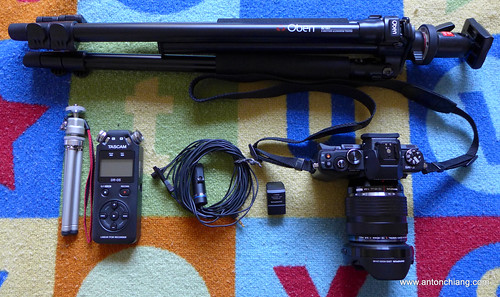

Video Production Kit 1

I’ve recently bought the EM-5 in order to have a lighter interchangeable lens camera. Although I still love my Canon 7D (and its many lenses), it’s not the easiest camera to travel with. The EM-5’s 5-axis image stabilization system makes it easy to shoot handheld, and its small size makes this one-camera interview kit extremely portable.
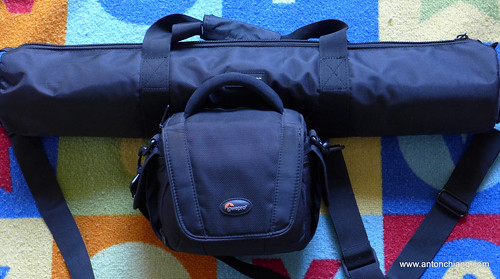
Video Production Kit 2

The 12-40mm f/2.8 lens is the “L” lens of the Micro Four Thirds world. It’s an extremely high quality lens for both video and still photography. The large f/2.8 aperture is a must to get that shallow depth of field film look. It is weather sealed just like the EM-5, and it makes for an excellent walk-around lens when traveling.

Nothing makes a video feel “amateurish” more so than terrible audio captured with the on-camera microphone. For interviews, my 10 year old Realistic condenser lavalier mic still provides better audio quality than any on-camera microphones ever could. I consider audio for video a critical part of any videos worth capturing, and the Tascam DR-05 was set up on the desk in front of Brian as a backup (just in case something goes wrong with in-camera audio capture).

Lighting:

Most offices have fluorescent lamps that look horrible on camera, and this office was no exception. With limited choices in locations, I was lucky enough to find a large office with a glass wall that allowed diffused natural sunlight to come in. This was not the best lighting solution, but with my limited time and resources, it was simply not feasible to bring in and set up a three point lighting kit. Having said this, lighting is the first area I would seriously consider improving in future shoots.

A photo posted by Anton Chiang (@antonchiang) on


Production Process:

To make Brian feel more at ease, I simply rolled the camera and started talking to him. I had to pay very close attention to what Brian was saying, and repeat the question if his response was unusable even with editing. This was a delicate process since 1. my time was limited and 2. the more you make your subject repeat, the more nervous they tend to get. For folks who do not have formal media training, talking into a camera can be a nerve wrecking experience. Filler words such as “ehs” and “ems” begin to increase in frequency when one’s self conscious in front of the camera. It can help to ask the subject to be conscious of not using filler words. In addition, developing a good rapport with the subject can also make the entire process less difficult. 

Post Production:

Brian did fairly well for a completely unrehearsed and rushed interview. However, this still meant that the raw footage I got required some serious editing. I wanted to get the video posted as soon as possible, and I had to show Brian the rough cut before he left town. To expedite the process, I simply used the company PowerPoint template to create all titles and graphics. The entire raw footage file was dumped into the Final Cut Pro X timeline, and I simply cut the clip as I watched it for usable sentences and sound bites. I tried to keep the edits at a slightly fast pace (similar to the quick jump-cut style edit made popular by YouTube vloggers). At the end of the day, I think I was able to introduce Brian to our community in a way that’s infinitely more personable than a text interview.

Obviously, this is a fast paced “good enough” type of production process. If budget allows, community managers should always utilize video professionals to deliver the best results possible. Having said this, I highly encourage you to give the DIY method a try. It can be a rewarding experience for both you and your community. And with success, it may lead to something much bigger than a one-man show.

Friday, June 5, 2009

Google Wave: Initial thoughts


The announcement of Google Wave last week has generated a lot of buzz on the web. By combining email, IM and wiki in a real time collaboration platform, Google Wave has the potential to be the next game changing killer app, drastically changing the way we communicate. I've read a number of reviews in the past few days, and it's been interesting to see many different opinions and predictions around this hot topic. After digesting much information, some of my initial thoughts around Google Wave are as follows:

  • Synchronous vs asynchronous communication. Will Google Wave eliminate the need for unproductive meetings? The email/IM/wiki mashup in real time will potentially change corporate cultures by introducing new workflows and change the very definition of meetings. It will be harder to hide behind endless email threads and meeting requests. However, it will also introduce new challenges to time management and project management, becoming a potential for constant distraction. What will this do to employers'/individuals' expectations for "always on, always real time" communications?
  • Forums, social networks and collaboration software. What will be Google Wave's impact to companies/products such as Lithium, Jive, Facebook, and SharePoint? The freedom to unlock content from isolated platforms and bring them into the Wave will be liberating for end users, but how will social media and collaboration platform vendors differentiate themselves and survive the tidal wave? Can you survive without being a part of the developer ecosystem?
  • Interpersonal communication vs. mass communication. Social media and collaboration technologies continue to erode the line between interpersonal communication and mass communication. It appears that Google Wave will continue to blur this line as well. What will be some of the privacy and content ownership issues resulting from this new way to communicate?
As we hear more about Google Wave in the next few months, I am sure more conversations will be created around the impacts of Google Wave. I'd love to hear your thoughts on this topic. Leave a comment below if you'd like to share your thoughts/blogs on Google Wave.

Wednesday, June 3, 2009

Slideshow of Flickr photos tagged with "Computex" and "2009"

Dynamic slideshow of all public photos on Flickr tagged with "Computex" and "2009".

Tuesday, June 2, 2009

Web Community Vlogs in the B2B Environment

The art and science of building strong online communities continue to evolve rapidly, and one of the toughest challenges for web community managers out there is to "keep them coming back for more". Community management and power user development are both important to maintain the health of your online community. However, to jump start a new or stale community environment, an injection of useful and interesting content must be a top priority.

Faced with this challenge last year, I was tasked to re-launch an existing technical community on a new platform and take the current activity level to a new high. This was no easy task. After all, B2B products and services are just not as sexy as the next high tech consumer gadget. How do you keep an existing community base interested and lure them to bookmark your community as a destination site? Further more, how do you make it so engaging that they can't wait to share the positive experience with their colleagues? For me, the answer was in rich media and community advocate personalities.

I am fortunate enough to work with an extremely talented team here at Juniper Networks. After much consultation with my team members, the community vlog was born.

I have to admit, even those of us directly involved with the vlog program were slightly skeptical when it was first launched. Deep down inside, I firmly believed in what I was doing: My thesis in graduate school was on the convergence of video and multimedia PC presentations, and I've never looked back since then. I know webcasting works, I know rich media experiences enhance the learning process. However, I've never applied what I know to a B2B technical community setting before, and my fingers were definitely crossed when the first video was launched.

With the help of our award winning staff producer Kevin Eck and an extremely talented community advocate Tawnee Kendall, the vlog program was a hit. My talented teammates were able to make the community vlogs interesting, yet not cheesy or over the top. Community members slowly began to feel like they know "J-Net Tawnee" personally, and praises began to fly in via PM, email, Facebook and Twitter. Value added contents were presented to the community via short, engaging vlog videos. As a result, we began to see registration, page view and participation increase exponentially.

Under the guidance of our manager Paul Gilliham (a seasoned web professional with some serious site architecture and user experience expertise under his belt), we continued to tweak the program, update content and enhance our user management/ranking programs. Today, the difference between that old community we inherited two years ago and our current community is clearly a contrast between night and day.

The current community vlog on our user promo program is embedded below. For the rest of our community vlogs, check out the Juniper Media Center YouTube Channel. I hope you find these videos interesting, even if you are not in the networking equipment industry.

Windows 7 Netbooks/Notebooks at Computex 2009

According to Engadget Chinese, a number of Netbooks and Notebooks running Windows 7 (RC build 7100) are appearing at Computex 2009. Check out Sharp's Mebius PC-NJ70Apro with a sub-screen on the touchpad!